 Hoa Kỳ

tomtommyyuan/spmind
[ICML 2026] Autonomous AI agent for end-to-end spatial proteomics analysis, with SP-Bench for agentic multiplexed-imaging workflows.
Thành tựu nổi bật
Những danh hiệu mới nhất của dự án
#1 Repository Của Tháng
#1 Repository Của Tháng
#1 Repository Của Tháng
🧬 SP-Mind: An Autonomous Reasoning Agent for Spatial Proteomics (ICML 2026)



▶ 55-second overview — if the player doesn't load, watch the demo video.
Abstract
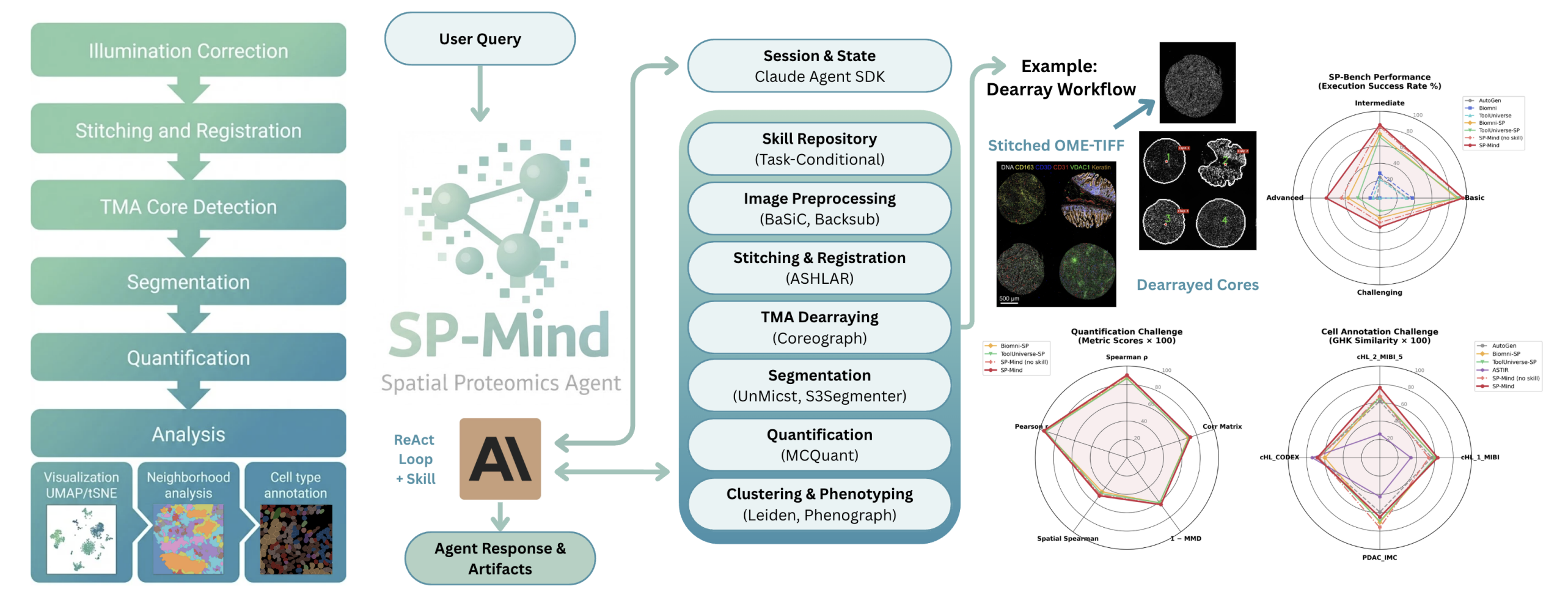
Spatial proteomics enables single-cell-resolution characterization of protein expression within tissue architecture, playing a critical role in understanding tumor microenvironments and guiding precision medicine. However, current analysis workflows remain fragmented, requiring expert manual orchestration of heterogeneous tools and limiting research scalability and reproducibility. We present SP-Mind, the first autonomous AI agent designed to unify the spatial proteomics analysis pipeline, from raw multiplexed tissue imaging to downstream phenotype discovery. Equipped with expert-curated biological analysis skills and specialized computational tools, SP-Mind converts natural-language queries into end-to-end analytical workflows without task-specific fine-tuning. To rigorously evaluate its capabilities, we introduce SP-Bench, a comprehensive benchmark spanning diverse tissue types, comprising 102 tasks across 18 distinct categories. Through extensive evaluation on SP-Bench and established downstream tasks, SP-Mind achieves state-of-the-art performance compared to existing open-source biomedical agent baselines.
Overview
SP-Mind is built on the Claude Agent SDK and ships with:
- A reasoning agent that selects tools, writes code, inspects intermediate results, and iterates in a data-driven loop.
- Wrappers around the standard multiplexed-imaging toolchain (MCMICRO-style), packaged as containerized tools.
- A curated set of domain skills that inject best-practice methodologies for each analysis stage.
- SP-Bench, a benchmark of realistic spatial proteomics task queries, plus evaluation scripts for cell annotation and quantification.
Agent Design
- MCP-native tools (opt-in). With
--mcp, the full toolchain is exposed to the agent as a Model Context Protocol server of typed, schema-validated tools (generated from the tool metadata inspmind/tool/tool_description/), rather than as free-form code the model has to write. The same server can be installed into Claude Desktop / Claude Code (see Use SP-Mind inside Claude). Off by default, so the base agent's behavior is unchanged. - Sandboxed execution. An optional
--sandboxflag installsPreToolUseguardrails that block destructive shell commands before they run — a safety layer for fully autonomous (--dangerously-skip-permissions) runs.
Pipeline Capabilities
| Stage | Module | Backend |
|---|---|---|
| Illumination correction | spmind.tool.basic_illumination | BaSiC |
| Registration / stitching | spmind.tool.registration | ASHLAR |
| Background subtraction | spmind.tool.background_subtraction | Backsub |
| TMA dearraying | spmind.tool.unetcoreograph | UNetCoreograph |
| Nuclei probability maps | spmind.tool.segmentation_unmicst | UnMICST |
| Cell segmentation | spmind.tool.segmentation_s3segmenter | S3Segmenter |
| Quantification | spmind.tool.quantification | MCQuant |
| Clustering & phenotyping | spmind.tool.clustering | Scimap |
| Cell-type annotation | skill-guided LLM reasoning | — |
Installation
Prerequisites
- Python ≥ 3.11
- Claude Code CLI —
npm install -g @anthropic-ai/claude-code - A container runtime for the imaging tools: Docker (local) or Apptainer/Singularity (HPC)
Install the package
git clone https://github.com/tomtommyyuan/spmind.git
cd spmind
pip install -e .
(Optional) Install scimap for host-side analysis
The clustering and phenotyping steps run scimap inside the tool containers, so
scimap is not required for the core pipeline and is intentionally left out of the
package dependencies. If you want scimap available in your local environment (e.g.
for interactive downstream analysis), install it separately. Its published metadata
pins several outdated versions, so install it without dependencies and then add the
runtime extras:
pip install scimap --no-deps
pip install combat fast_histogram smart_open requests "gensim>=4.3.2" \
    shapely plotly mpl-scatter-density PhenoGraph "dask[array]" tifffile
Configure your API key
cp .env.example .env
# then edit .env and set ANTHROPIC_API_KEY=...
Or export it directly:
export ANTHROPIC_API_KEY="your-anthropic-api-key"
Pull the tool containers
The analysis tools run inside containers. Pull them once with the helper scripts:
# Linux / Intel Mac
bash scripts/pull_docker_images.sh

# Apple Silicon (ARM64)
bash scripts/pull_docker_images_arm64.sh

# HPC with Apptainer / Singularity
bash scripts/pull_singularity_images.sh
Quick Start
1. Interactive CLI
The fastest way to start. Launches an interactive session (like Claude Code):
spmind --dangerously-skip-permissions
Or run a single task non-interactively:
spmind -p "Perform cell probability mapping + segmentation on 1.ome.tif, save the result to ./output" --dangerously-skip-permissions
Useful flags: --model claude-sonnet-4-5, --path ./data, -v (verbose),
--mcp (expose the toolchain as native MCP tools), --sandbox (block
destructive shell commands), --dangerously-skip-permissions (fully autonomous).
2. Python API
from spmind.agent import SPMindAgent

agent = SPMindAgent(path="./data", model="claude-sonnet-4-5")

result = agent.go(
    "Generate illumination correction profiles for the 10 raw cycles in "
    "./data/illumination_input and save the flat-field/dark-field profiles to ./data/illum"
)
print(result)

# Multi-turn: the session is maintained automatically
agent.go("Now stitch and register those cycles into a single mosaic.")

# Start a fresh conversation
agent.reset_session()
For streaming output, use async for msg in agent.go_stream(prompt): ....
3. Script runner
run_agent.py runs a single prompt and logs the full trace with a timestamp:
python run_agent.py "Segment cells in 1.ome.tif and quantify marker intensities" \
    --output-dir ./agent_logs --dangerously-skip-permissions
4. Web interface
python gradio_app.py
5. Use SP-Mind inside Claude
Because the toolchain is exposed as an MCP server, you can call the SP-Mind tools
directly from your own Claude Code or Claude Desktop session. This is a
local integration — SP-Mind must be pip install-ed and its containers pulled
on your machine, and the tools run locally (nothing is uploaded).
Option A — add the MCP server directly:
# Claude Code
claude mcp add spmind -- python -m spmind.mcp_stdio
For Claude Desktop, add to claude_desktop_config.json:
{
  "mcpServers": {
    "spmind": { "command": "python", "args": ["-m", "spmind.mcp_stdio"] }
  }
}
Option B — install as a Claude Code plugin (this repo doubles as a plugin marketplace):
/plugin marketplace add tomtommyyuan/spmind
/plugin install spmind@spmind
Both options expose the same 19 typed tools.
Benchmark & Experiments
benchmark/— SP-Bench task queries (sp_bench.jsonl) spanning the full spatial proteomics pipeline across difficulty tiers, plus a generator script.experiments/— reproduction scripts for the three evaluation tracks in the paper (SP-Bench execution, cell annotation, cell quantification). Seeexperiments/README.mdfor full instructions and dataset download links.
[!NOTE] Model version. All experiments reported in the paper were run with Claude Sonnet 4 (
claude-sonnet-4-20250514). That model has since been retired, so for a smooth out-of-the-box experience the codebase now defaults to Claude Sonnet 4.5 (claude-sonnet-4-5).
The SP-Bench and cell annotation datasets are hosted on Hugging Face:
huggingface-cli download tomyuanyucheng/spmind --repo-type dataset --local-dir data
Citation
If you find SP-Mind useful, please cite our paper:
@misc{yuan2026spmindautonomousreasoningagent,
      title={SP-Mind: An Autonomous Reasoning Agent for Spatial Proteomics Analysis},
      author={Yucheng Yuan and Yuanfeng Ji and Zhongxiao Li and Ruijiang Li},
      year={2026},
      eprint={2606.24235},
      archivePrefix={arXiv},
      primaryClass={cs.AI},
      url={https://arxiv.org/abs/2606.24235},
}
License
SP-Mind is released under the terms of the LICENSE file in this repository. Note that the integrated third-party tools and their container images may carry their own licenses; review each before commercial use.
Dự án tương tự
Khám phá các dự án và mô hình AI khác có sự tương đồng.
Open-source Python library for AI browser agents, plus Browser Use Cloud: stealth browsers and a hosted agent API.
The agent harness performance optimization system. Skills, instincts, memory, security, and research-first development for Claude Code, Codex, Opencode, Cursor and beyond.
Makes your AI agent think like the laziest senior dev in the room. The best code is the code you never wrote.
Scalable spatial omics in the browser for hundreds of samples at once | 10x, IMC, IF, H&E, CosMX, & more | https://rakaia.io/
Reverse engineer anything with agents, from app behavior down to native binaries.
Knowledge infrastructure to make your agents smarter. Search, scrape and access 550+ data providers through one API.