 Pakistan
RizwanMunawar/sam3-inference
The repository provides code for running inference with the Meta Segment Anything Model 3 (SAM 3).
Thành tựu nổi bật
Những danh hiệu mới nhất của dự án
#1 Repository Của Tháng
#1 Repository Của Tháng
#1 Repository Của Tháng
SAM 3: Segment Anything 3




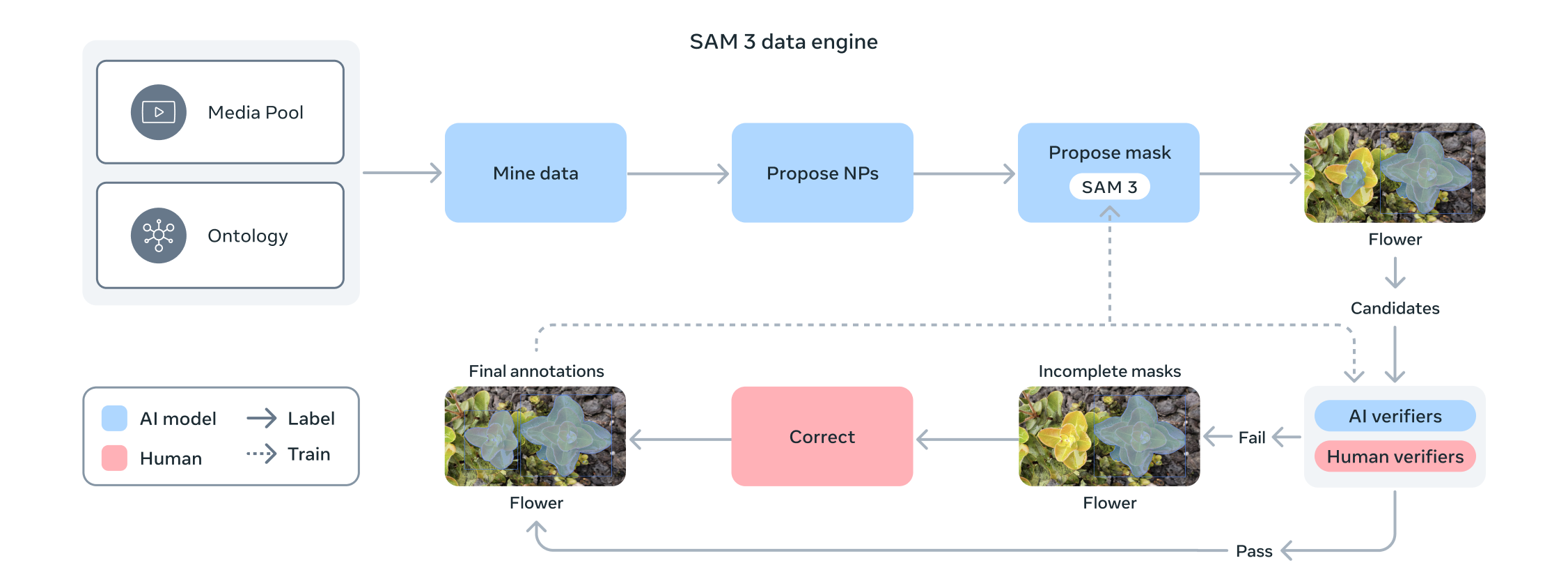
SAM 3 is a unified foundation model for promptable segmentation in images and videos. It can detect, segment, and track objects using text or visual prompts such as points, boxes, and masks. Compared to its predecessor SAM 2, SAM 3 introduces the ability to exhaustively segment all instances of an open-vocabulary concept specified by a short text phrase or exemplars. Unlike prior work, SAM 3 can handle a vastly larger set of open-vocabulary prompts.
https://github.com/user-attachments/assets/47fa9fa6-487e-4965-b628-ba9168c7bbdd
Features supported (in this repo):
Prerequisites
- ✅ Python 3.12 or higher
- ✅ PyTorch 2.7 or higher
- ✅ CUDA 12.2 or greater (not necessarily required, you can also use CPU)
Model Weights
| Model | Download |
|---|---|
| SAM3 Weights | Download from 🤗 |
| SAM3.1 Weights | Download from 🤗 |
Installation 👨💻
-
Create a new virtual environment:
python3 -m venv "sam3test" source sam3test/bin/active -
Install PyTorch with CUDA support (CUDA>=12.2):
pip install torch==2.7.0 torchvision torchaudio \ --index-url https://download.pytorch.org/whl/cu126 -
Clone the repository and install the package:
git clone https://github.com/RizwanMunawar/sam3-inference
cd sam3-inference
pip install -e .
⚠️ Note: Access to the sam3.pt checkpoint must be requested via the SAM 3 Hugging Face repository.
Once your request is approved, you’ll be able to download and use the sam3.pt model for inference with the example shown below.
Inference on Image 🎉
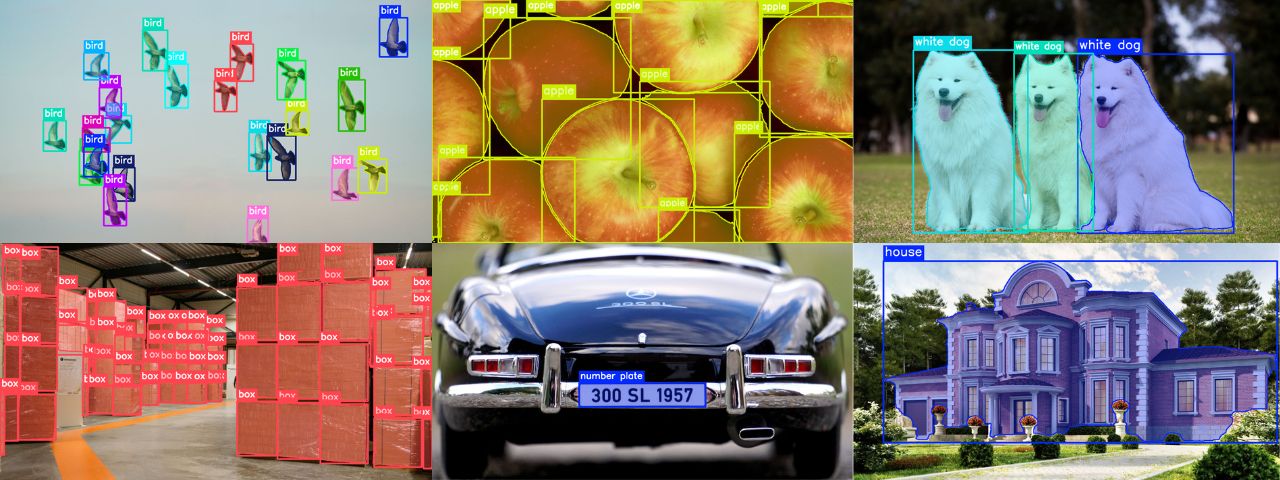
import cv2
from PIL import Image
from sam3 import build_sam3_image_model
from sam3.model.sam3_image_processor import Sam3Processor
from sam3.visualize.utils import draw_box_and_masks

label_to_predict = "white dog"  # this will be used as prompt for inference.

url = "assets/images/dogs.jpg"
image = Image.open(url)  # Image load

# SAM3 model load
processor = Sam3Processor(build_sam3_image_model(checkpoint_path="sam3.pt"))

# Run inference with text prompt
results = processor.set_text_prompt(state=processor.set_image(image),
                                    prompt=label_to_predict)

# Visualization
result_image = draw_box_and_masks(cv2.imread(url, cv2.COLOR_RGB2BGR),  # PIL -> OpenCV
                                  results=results,
                                  show_boxes=True,
                                  show_masks=True,
                                  line_width=4,
                                  label=label_to_predict)

cv2.imwrite("sam3_results.png", result_image)  # Save (optional)
Auto annotation 🔥
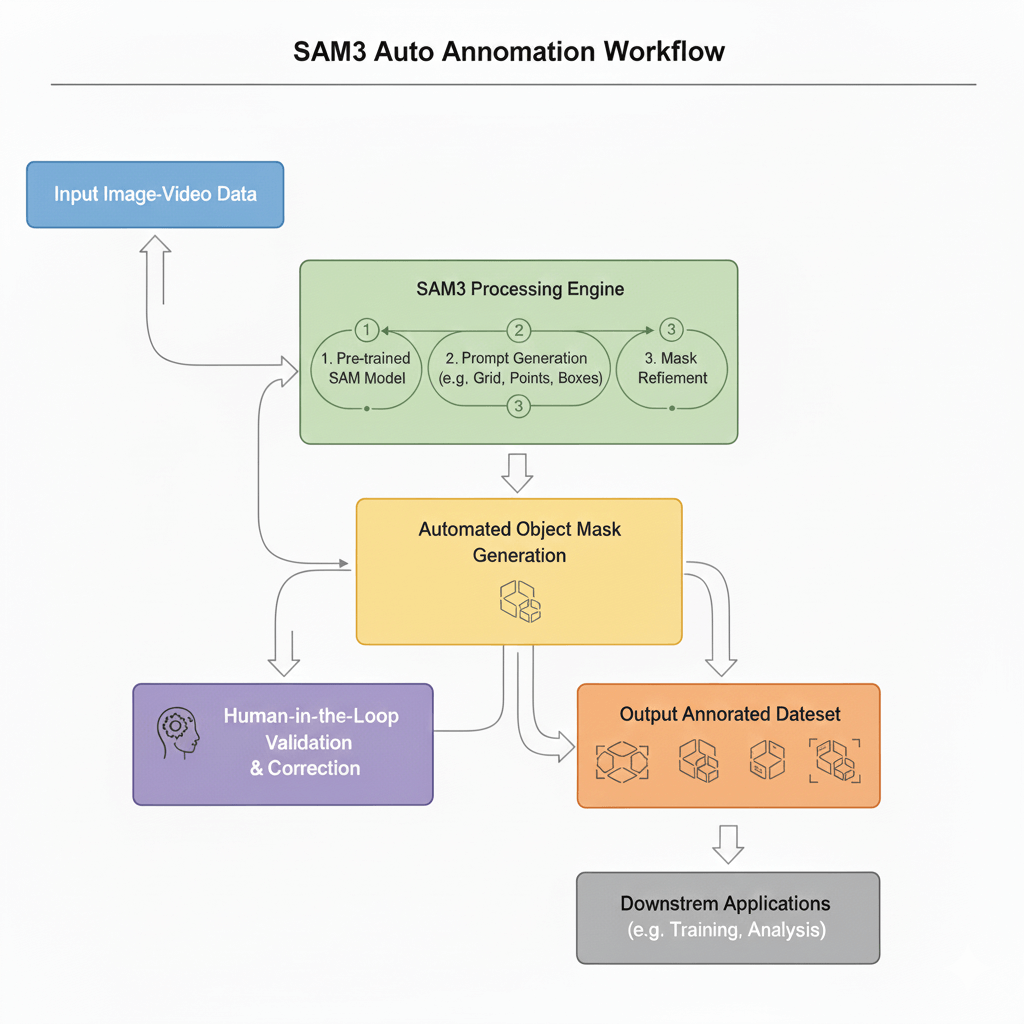
import os
import cv2
from PIL import Image
from sam3 import build_sam3_image_model
from sam3.model.sam3_image_processor import Sam3Processor
from sam3.visualize.utils import draw_box_and_masks

# SAM3 model load (cpu inference also supported)
processor = Sam3Processor(build_sam3_image_model(checkpoint_path="sam3.pt"))

images_dir = "assets/images"
yolo_ann_dir = "assets/images/yolo_labels"
if not os.path.exists(yolo_ann_dir):
    os.mkdir(yolo_ann_dir)

# Auto annotation
label_to_predict = "bird"
for i, img in enumerate(os.listdir(images_dir)):
    url = os.path.join(images_dir, img)
    image = Image.open(url)  # Image load

    # Run inference with text prompt
    results = processor.set_text_prompt(state=processor.set_image(image),
                                        prompt=label_to_predict)

    # Visualization and auto annotation in YOLO format.
    result_image = draw_box_and_masks(
        cv2.imread(url, cv2.COLOR_RGB2BGR), # PIL -> OpenCV
        results=results,                    # SAM3 predictions
        show_boxes=True,                    # Display bounding boxes on output image
        show_masks=True,                    # Display masks on output image
        mask_alpha=0.4,                     # Adjust mask overlay value, range [0.0 - 1.0]
        show_conf=True,                     # Bool: display object confidence score.
        show_label=True,                    # Bool: display class label.
        line_width=4,                       # Int: Adjust label, box, and mask fontsize.
        label=label_to_predict,             # Str: Bounding box/mask label
        save_yolo=True,                     # Bool: Write annotations in YOLO format.
        filename=os.path.join(yolo_ann_dir, img[:-4]+".txt"),  # Str: Annotation file name.
        class_id=0                          # only useful for bbox and mask color selection.
    )
    print(f"{i+1} Images processed, annotations saved in {yolo_ann_dir}")
Inference on video 😍
⚠️ Currently, video processing runs frame-by-frame. This means the model does not retain object information from previous frames yet.
import cv2
from PIL import Image
from sam3 import build_sam3_image_model
from sam3.model.sam3_image_processor import Sam3Processor
from sam3.visualize.utils import draw_box_and_masks

# === Settings ===
label_to_predict = "dog"
input_video = "path/to/video.mp4"
output_video = "output_sam3.avi"
model_path = "sam3.pt"

# === LOAD MODEL ===
print("[INFO] Loading SAM3 model...")
processor = Sam3Processor(build_sam3_image_model(checkpoint_path=model_path))

# === VIDEO CAPTURE ===
cap = cv2.VideoCapture(input_video)
if not cap.isOpened():
    print("Error opening video file")
    exit()

fps = int(cap.get(cv2.CAP_PROP_FPS))
width  = int(cap.get(cv2.CAP_PROP_FRAME_WIDTH))
height = int(cap.get(cv2.CAP_PROP_FRAME_HEIGHT))
fourcc = cv2.VideoWriter_fourcc(*"XVID")
writer = cv2.VideoWriter(output_video, fourcc, fps, (width, height))

frame_count = 0

# === PROCESS VIDEO ===
while True:
    ret, frame = cap.read()
    if not ret:
        break

    frame_count += 1
    print(f"[INFO] Processing frame {frame_count}")

    # OpenCV (BGR) -> PIL (RGB)
    image_pil = Image.fromarray(cv2.cvtColor(frame, cv2.COLOR_BGR2RGB))

    # Run inference
    state = processor.set_image(image_pil)
    results = processor.set_text_prompt(state=state, prompt=label_to_predict)

    # Draw bbox + mask
    output_frame = draw_box_and_masks(frame, results=results, show_boxes=True,
                                      show_masks=True, line_width=3, label=label_to_predict)

    writer.write(output_frame)  # Write processed frame

# === CLEANUP ===
cap.release()
writer.release()
cv2.destroyAllWindows()
License
This project is licensed under the SAM License - see the LICENSE file for details.
References
Dự án tương tự
Khám phá các dự án và mô hình AI khác có sự tương đồng.
Ultralytics YOLO27, YOLO26, YOLO11, YOLOv8 — object detection, instance segmentation, semantic segmentation, image classification, pose estimation, object tracking
Mask R-CNN for object detection and instance segmentation on Keras and TensorFlow
Object Detection toolkit based on PaddlePaddle. It supports object detection, instance segmentation, multiple object tracking and real-time multi-person keypoint detection.
RF-DETR is a real-time object detection and segmentation model architecture developed by Roboflow, SOTA on COCO, designed for fine-tuning. [ICLR 2026]
Framework agnostic sliced/tiled inference + interactive ui + error analysis plots
locate-anything.cpp - GGUF GGUF builds of nvidia/LocateAnything-3B(https://huggingface.co/nvidia/LocateAnything-3B) for locate-anything.cpp(https://github.com/mudler/locate-anything.cpp) - a C++/ggml inference engine for open-vocabulary detection /...
DETR (End-to-End Object Detection) model with ResNet-50 backbone DEtection TRansformer (DETR) model trained end-to-end on COCO 2017 object detection (118k annotated images). It was introduced in the paper End-to-End Object Detection with Transformer...