
Kareem-Shabaka/stutter-guard
Measured, reversible DPC latency & micro-stutter optimizer for Windows 10/11. Isolates gaming cores, automates CPU interrupt affinity (GPU, mouse, NIC RSS), disables latency-inducing network power saving, and tunes timers with zero snake oil. Built on empirical latency logs, transparent trade-offs, full journaling, and Safe Mode undo
Thành tựu nổi bật
Những danh hiệu mới nhất của dự án
#1 Repository Của Ngày
#1 Repository Của Ngày
#1 Repository Của Ngày
Stutter Guard





Average FPS is not what decides whether a game feels smooth - or whether real-time audio stays glitch-free.
Average FPS measures compute. It does not measure what happens when your mouse moves, a network packet arrives, or an audio buffer runs, because none of that is compute. It is interrupt work, and Windows delivers it to whichever core it likes - including the cores running your game or DAW. That is how a fast machine still produces frametime spikes and audio dropouts.
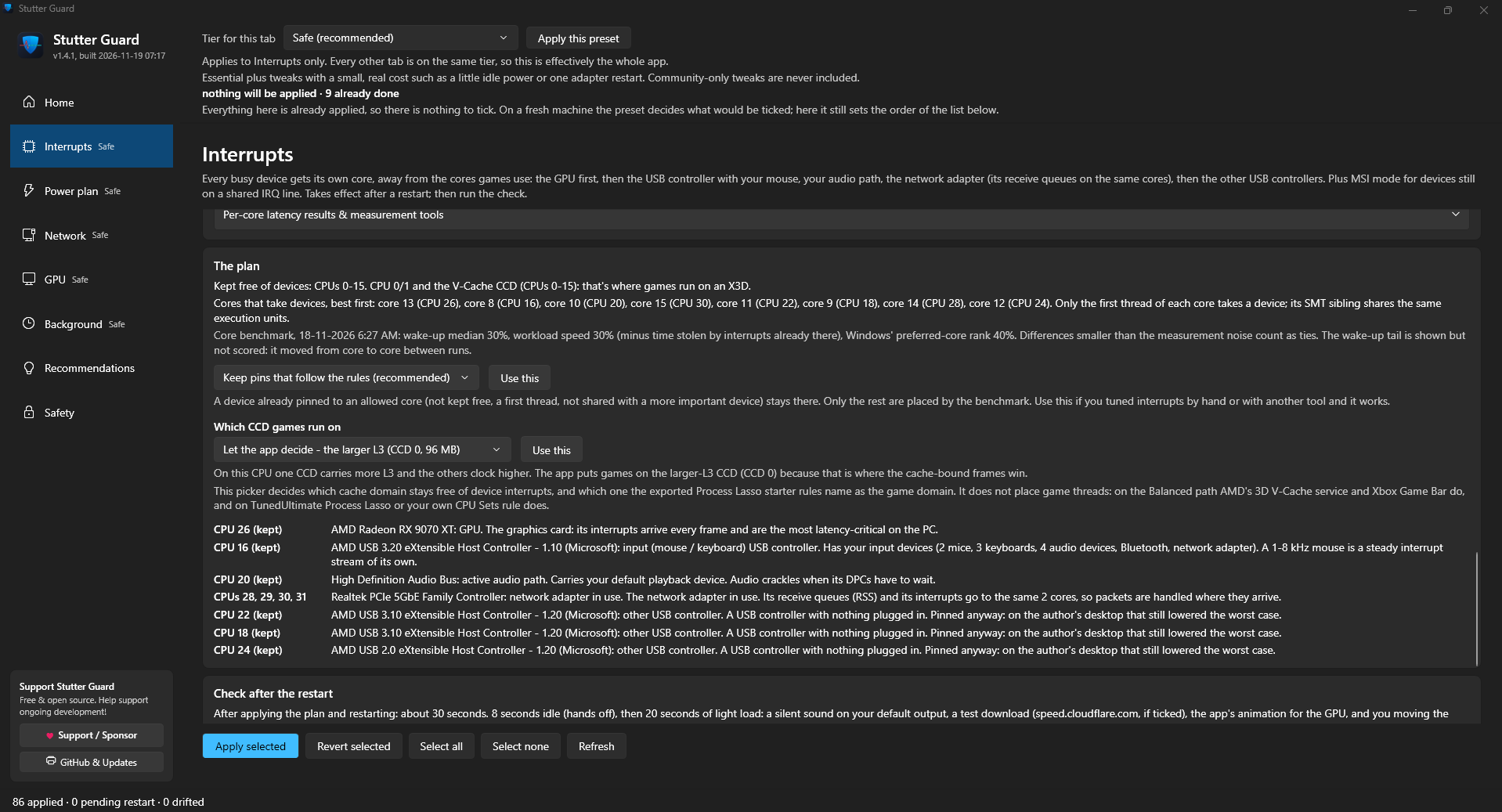
Stutter Guard measures per-core wake latency and pins each busy device (GPU, USB, audio interface, network) to a dedicated first-thread core - keeping CPU 0/1 clear on every system, and keeping the V-Cache CCD or P-cores free of devices on split-topology CPUs. Every change is journalled before it runs, so you can revert all of it, even from Safe Mode.
Download Stutter Guard 1.4.1
One self-contained .exe, about 65 MB, Windows 10 or 11 x64. No installer, no .NET runtime, no account.
The difference, in one table
| Measures | Changes | Proves it helped | Reversible | |
|---|---|---|---|---|
| LatencyMon | yes | no | - | - |
| Process Lasso / IRQControl | no | yes | no | partially |
| "Optimiser" suites | no | yes | no | rarely |
| Stutter Guard | yes | yes | yes, per row | completely |
Most tools do one half of the job. Monitors tell you something is wrong and change nothing. Tweakers change things and cannot tell you whether it worked. Stutter Guard measures per core, moves devices accordingly, states the evidence behind each change, and hands you a script that undoes all of it.
Everything it does for you
| Benefit | What makes it true |
|---|---|
| Busy devices stop competing on the same cores | Device interrupts are pinned to dedicated first-thread cores ranked by measured wake latency. On AMD dual-CCD X3D parts the V-Cache CCD stays device-free; on Intel hybrid, P-cores stay clear; on single-CCD and classic CPUs, CPU 0/1 stay reserved and busy devices are spread across separate cores. |
| Built for real-time audio (DAW / ASIO) as well as gaming | Traces your active audio output back to its PCI or USB controller, gives it a dedicated first-thread core, disables USB selective suspend, USB 3 link power saving, PCIe ASPM, and deep C-states, and flags known-bad drivers so low-buffer audio stays free of wake-latency dropouts. |
| You get a measured number, not a mood | Each core is ranked by a short wake-jitter and speed benchmark, plus Windows' own scheduling hints - not by folklore about which cores are "better". |
| Every change can be undone, from Safe Mode, without this app | Each write is journalled to disk before it happens, and undo-all.ps1 is regenerated on every flush. No app, no installer, no network. |
| A Windows update cannot silently keep your tweaks reverted | Driver fingerprinting notices when an applied tweak was reset, names it on the Home screen, and re-applies it in one click - from the recorded factory value. |
| You see why something is greyed out | Every tweak carries Evidence (Measured / Documented / Anecdotal) and a Cost. Anecdotal tweaks appear only in the Everything tier. Unclassified ones are not selectable at all. |
| Nothing is installed behind your back | One .exe. No installer, no service, no tray icon, no updater, no bundled cleaner. The only thing it can leave running is a scheduled task you tick yourself, and it is journalled like everything else. |
| Known-bad drivers are identified, not guessed at | Installed driver versions are matched against a catalogued set of regressions using the same identifiers Windows itself matches on: hardware ids, compatible ids, and instance id. |
| Network work lands where its interrupts do | The adapter's receive-queue keywords are derived from the same processor span as its interrupt mask, so a receive queue's DPC lands on the core that services its ISR. |
| Five areas, one contract | Interrupts, power plan, network link, GPU driver keys, and background tasks. Every row across all five states what it does, why it works, what it costs, and what can break. |
The numbers, with their conditions
Every figure on this page names its instrument. No exception, because a number without one is a number you have to take on faith - which is what "snake oil" means.
The mechanism, measured. A ready thread waiting on a processor reserved for interrupts waits a median of 782 µs while synthetic load holds those cores busy. The same thread on a processor with no device pinned to it waits 8.9 µs. A control processor, never loaded, stayed at 10.7 µs - which is what makes this a locality result and not just a busy machine.
2,400 wake-ups per cell, two rounds, arm order rotated, load held at seven threads in both arms, placement verified by per-processor utilisation. Ryzen 9 9950X3D. Full method and limits.
The plan, verified on real hardware. Over 3 h 51 min of desktop idle with the three displays at 240 / 120 / 60 Hz: every one of the 297 interrupts recorded was serviced on CPU 18, the core the plan gives the USB input controller. The V-Cache CCD took zero. Fourteen of 32 processors took no interrupt and no DPC at all. No DPC reached 250 µs out of 2,775,336.
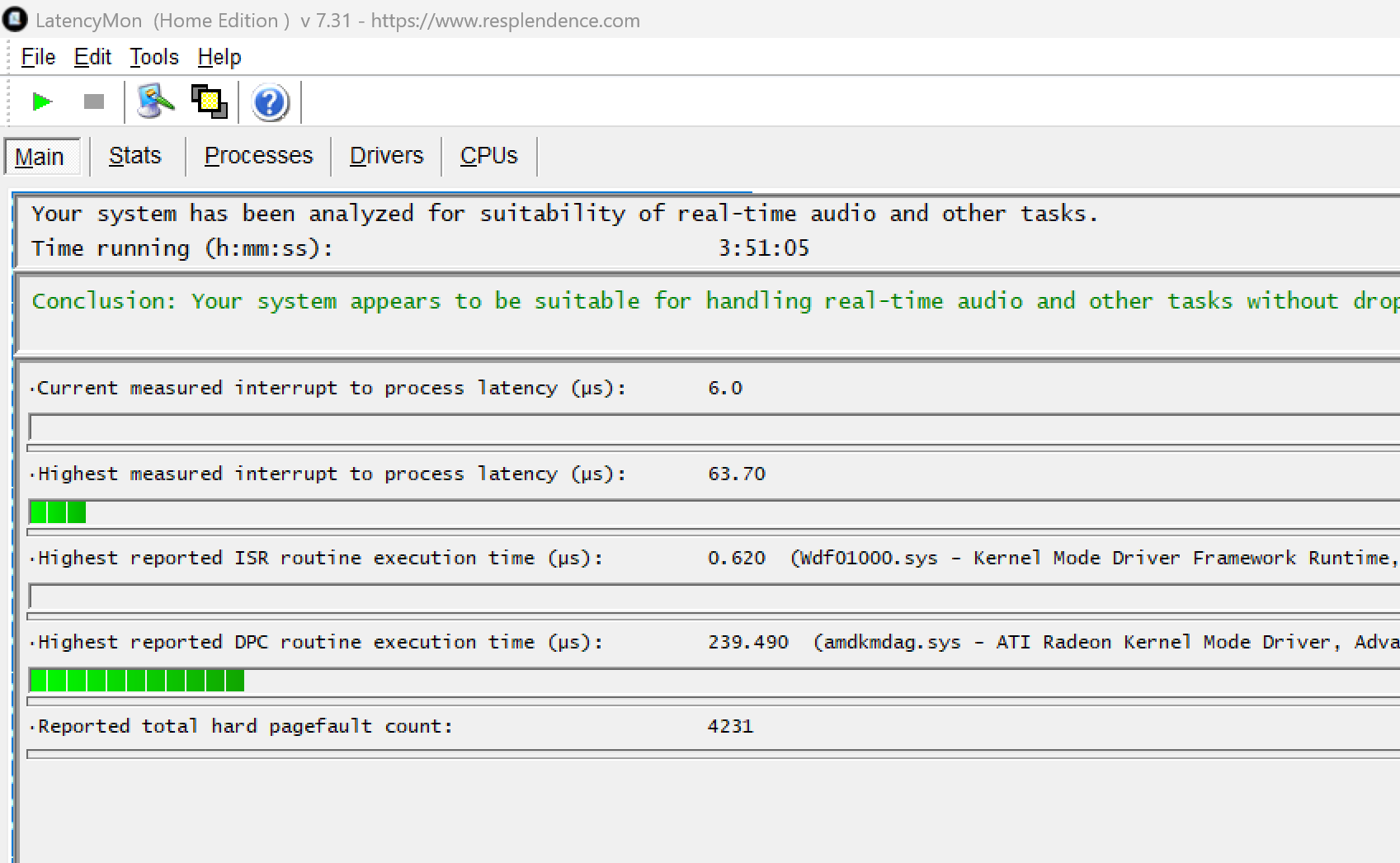
The result that plan produces. That is the target rather than the problem: the case this app is for is the one where a ready thread on a busy core waits 782 µs instead of 8.9 µs - a factor of about 90, measured, with the method below.
Which measurements move, and which cannot
The question that comes up most is a throughput benchmark before and after - Cinebench, 3DMark, a Y-cruncher run. Those will show no change, and knowing why is the point of this section.
A throughput benchmark saturates a workload and asks how much work completed. Interrupt placement does not change how many cores you have, what they clock to, or how many instructions they retire per second. It changes which processor performs device work, and therefore how long a ready thread waits before it gets one. That is a tail, not a rate.
| Instrument | Measures | Does this app move it? |
|---|---|---|
| Cinebench / 3DMark / Y-cruncher | Work completed under saturated load | No. Same cores, same clocks, same throughput |
| LatencyMon "highest interrupt to process" | One outlier across a whole run | Only if the outlier was itself a placement problem |
Core wake latency (tools/WakeProbe.cs) | How late a ready thread runs | Yes - 782 µs to 8.9 µs median, measured, control core proving locality |
| 1 % / 0.1 % frame times | The worst frames in a play session | Yes, when the stutter was device work or wake stalls hitting a render thread |
| Real-time audio dropouts (DAW / ASIO) | Buffer underruns, clicks and pops | Yes, when dropouts come from USB/PCIe power-saving wakes, deep C-states, or shared IRQ cores |
| Average FPS | Throughput while frames are steady | Only if it was already losing frames to stalls |
The measured result above is a wake latency figure, stated with its load condition, because that is the quantity placement changes. A throughput number would be the wrong instrument for this claim - not a weaker one.
Can it cost throughput? Only by misconfiguration, and the app refuses or states both cases: a
background mask that would leave fewer than four processors is not written at all, and the power tiers
print what they cost (a C1 cap trades some idle headroom for a flatter wake-up). On the Safe tier,
nothing here raises a clock, lowers a power limit or removes a core from the scheduler.
Install in three steps
1. Download and verify. Get StutterGuard.exe and StutterGuard.exe.sha256 from the
releases page, then check the hash:
Get-FileHash .\StutterGuard.exe -Algorithm SHA256
2. Run it. Windows asks for administrator rights, because interrupt and power settings are machine scope. Single self-contained file, about 65 MB - there is no .NET runtime to install.
3. Press a button that says what it does. It scans first and changes nothing until you do. Every action states what it is about to change, and states both counts before a tier switch.
Windows 10 or 11, x64.
How CPU interrupt affinity, MSI mode, and NIC RSS reduce stutter
Windows routes a device's interrupt using two documented mechanisms: the device's Affinity Policy and its MSI properties, both read when the device starts. One affinity mask applies to all of a device's interrupts; per-message targeting is reachable only from the driver.
Stutter Guard separates the two placements that decide your frame time:
- A pool of cores is protected and never receives a device: CPU 0 and its SMT sibling, plus, on AMD dual-CCD 3D V-Cache parts, the whole V-Cache CCD.
- Each busy device gets a core - GPU first, then the controller your mouse is on, then your audio path, then the network adapter, then remaining USB controllers. One core per device, first thread only, so an SMT sibling never halves a device's core.
Why not just move the processes?
Because the scheduler has no interrupt-load heuristic. A process's affinity is a request, and a full mask restricts nothing. Placement of the devices is what holds.
Already tuned it by hand?
Choose Keep pins that follow the rules. A device already sitting on an allowed core stays exactly
where it is; only the rest are placed.
Two Windows scheduling paths: Tuned Ultimate vs Balanced
| Path | Choose it when | What the app does |
|---|---|---|
| Manual affinity (Process Lasso, or this app alone) | You want device placement enforced | Parking off, tuned power plan, devices on their own cores |
| Windows-managed placement | You would rather Windows and the driver decided | Balanced plan, device power settings only |
The app never mixes them silently. The Power screen states which one you are choosing and what it commits you to.
Supported CPUs and hardware (AMD X3D, Intel hybrid, single-CCD)
| Family | Examples | Placement |
|---|---|---|
| AMD dual-CCD 3D V-Cache | 9950X3D, 9900X3D, 7950X3D, 7900X3D | Whole V-Cache CCD interrupt-free; devices on the second CCD |
| AMD multi-CCD | 5950X, 5900X, 3900X | Devices on the secondary CCD |
| Intel hybrid | 12th-15th Gen, Arrow Lake | P-cores for game threads; E-cores for network and audio |
| Intel classic | i7-7700K, i5-4690K | CPU 0/1 reserved; remaining cores stay available |
| Single-CCD | 7600X, 5600X | Interrupt affinity applies; rule generation reports nothing to separate |
Not supported: Windows on ARM, more than 64 logical processors, and forcing MSI or custom affinity onto NVMe drives or PCIe root bridges - which the app refuses by design, because a wrong value there can stop the machine starting.
FAQ
Will it trip anti-cheat? No. It changes no kernel code, loads no driver, and patches no binary. Vanguard, Ricochet, Easy Anti-Cheat, BattlEye and Xbox Game Pass inspect none of the registry values or device properties this app writes.
Can it damage my hardware? No setting here raises voltage, clocks or power limits. The real cost is that some power-saving states are disabled, so idle power draw and temperature rise - and the rows that cause that say so.
What if it breaks Windows?
Boot into Safe Mode and run %ProgramData%\Stutter Guard\undo-all.ps1. It restores the recorded
originals with no app and no installer. It is regenerated on every change, so it is never out of date.
Is the download signed?
Only if the release page says so. Check with Get-AuthenticodeSignature .\StutterGuard.exe: Valid means
signed, NotSigned means it is not, and Windows SmartScreen will warn accordingly. Every release also
publishes a SHA-256 generated from the exact bytes uploaded - that verifies the file arrived intact, but it
does not prove who built it, because anyone able to replace the download could replace the checksum beside
it. sign.cmd signs a local build when a certificate is available; signtool verify /pa is the check.
Do I need Process Lasso? Not for device placement - device interrupts are placed by this app. On the TunedUltimate path Windows core parking is off, so Windows also stops moving game processes between CCDs; something has to place them (Process Lasso, or your own CPU Sets rule), and this app does not do that. On the Balanced path Windows keeps placing games and nothing else is required.
Does it phone home? Never on its own. The hardware report and feedback are off until you press the button, and both show you the exact payload - destination, full text, every attachment and its size - before sending anything. No destination is built into the program: an address is configured once on your machine, and with none set the buttons say so and the report is saved to a file instead.
Windows 10? Yes, 10 and 11, x64.
Scope
What it measures and changes, and where that stops:
- Interrupt rates, not DPC durations. Handler durations need kernel ETW, which a desktop app does not have on most systems. Rates and per-core totals are what this app reads; a single long DPC seen in LatencyMon is not something it can attribute or explain.
- Device placement, not firmware. System Management Interrupts are raised below the operating system. No register, mask or power setting reaches them, so SMIs are reported as a remaining cause and nothing beyond that is claimed.
- Placement, not compositor work. Each attached display is composited at its own cadence, so a mixed-refresh-rate setup costs GPU work that no interrupt mask changes. The app reports the cost.
- One CPU and one GPU pair (9950X3D, RX 9070 XT) stand behind the figures above. The mechanism is documented by Microsoft and applies generally; the 782 µs magnitude is specific to that hardware.
For developers
dotnet build -c Release
dotnet run --project tests/DpcTweaker.SelfTest -c Release   # 1,476 assertions
build.cmd                                                    # publish\StutterGuard.exe
build.cmd --verify-repro                                     # prove two clean builds match
src/DpcTweaker.Core/   engine, journal, catalog, interrupt planner - no UI, so it tests headlessly
  Infra/               journal, backups, undo-script generation, registry, scheduled tasks
  Interrupts/          affinity planner, core benchmark, interrupt check, overlap detector
  Tweaks/              the catalog: every tweak declares evidence, cost, risk and revert path
  Detection/           topology, PnP nodes, displays, services, scheduled tasks
src/DpcTweaker.UI/     view models and page composition
src/DpcTweaker.App/    WPF shell, navigation, styles
tests/                 dependency-free self-test executable
tools/                 the instruments behind the published numbers
docs/                  measurement method, architecture, release notes
- CONTRIBUTING.md - build, test, and the
Evidence/TweakCostcontract. - SECURITY.md - private disclosure, and exactly what this app can reach.
- docs/ARCHITECTURE.md - the transaction shape and why it is built that way.
- docs/MEASUREMENT.md - every figure above, its method, and its limits.
Releases
License and support
GPL-3.0. See LICENSE and COPYRIGHT. Commercial licensing on request. Questions, hardware scans, and gaming/DAW benchmark results are welcome in Discussions.
If this saved you a weekend of LatencyMon logs, you can sponsor development. Sponsorship buys time to measure on hardware other than one machine - the largest gap this project has.
Acknowledgments
Microsoft's Windows Internals documentation and the Windows Driver Kit for the interrupt and power
contracts; the LatencyMon author for the instrument that made the investigation possible; Bitsum's
Process Lasso and IRQControl, whose own documentation clarified what AssignmentSetOverride can and
cannot do; and the maintainers of the driver regression reports this catalogue draws from.
Dự án tương tự
Khám phá các dự án và mô hình AI khác có sự tương đồng.
🚀 An open and lightweight modification to Windows, designed to optimize performance, privacy and usability.
collection of various resources devoted to performance and input lag optimization
See where the milliseconds go: mouse, OS, game queue, GPU. Then trim them. Measure first, tweak second, no placebo.
An elegant RTSS Overlay to showcase your benchmark stats in style.
Video game library manager with support for wide range of 3rd party libraries and game emulation support, providing one unified interface for your games.
Free, open-source Windows optimization tool for performance, privacy, and simplicity.
Entitas is a super fast Entity Component System (ECS) Framework specifically made for C# and Unity
Open-source Windows game resource manager. Suppresses background processes, gives games exclusive CPU cores, steers device interrupts off game cores, applies per-game GPU driver, memory and power policies, and restores every change after play. No injection, no telemetry. GPL-3.0.