 Nhật Bản

jamsinclair/opifancontrol
A simple PWM fan controller for Orange Pi boards
opifancontrol
A simple PWM fan controller for Orange Pi boards using GPIO pins (Only tested on an Orange Pi 5 and Orange Pi 5 Plus).
ℹ️ The SoC processor used by Orange Pi 5 and Orange Pi 5 Plus also supports built-in fan control that can be updated with UEFI firmware. This project is focused on a providing a simple solution without updating firmware. For more information see UEFI Fan Control.
Features
- Runs as a systemd service
- Automatically control the speed of a PWM fan based on the temperature of the CPU
- Configurable thresholds for fan speed and temperature
- Ramp up and ramp down delays to avoid rapid on/off switching of the fan
Setup
Hardware Setup
Orange Pi 5
Needed parts:
- Orange Pi 5
- Noctua NF-A4x10 5V PWM note that only the
5V PWMis supported, other voltages or nonPWMvariants are not.
Connect the 3 fan wires.
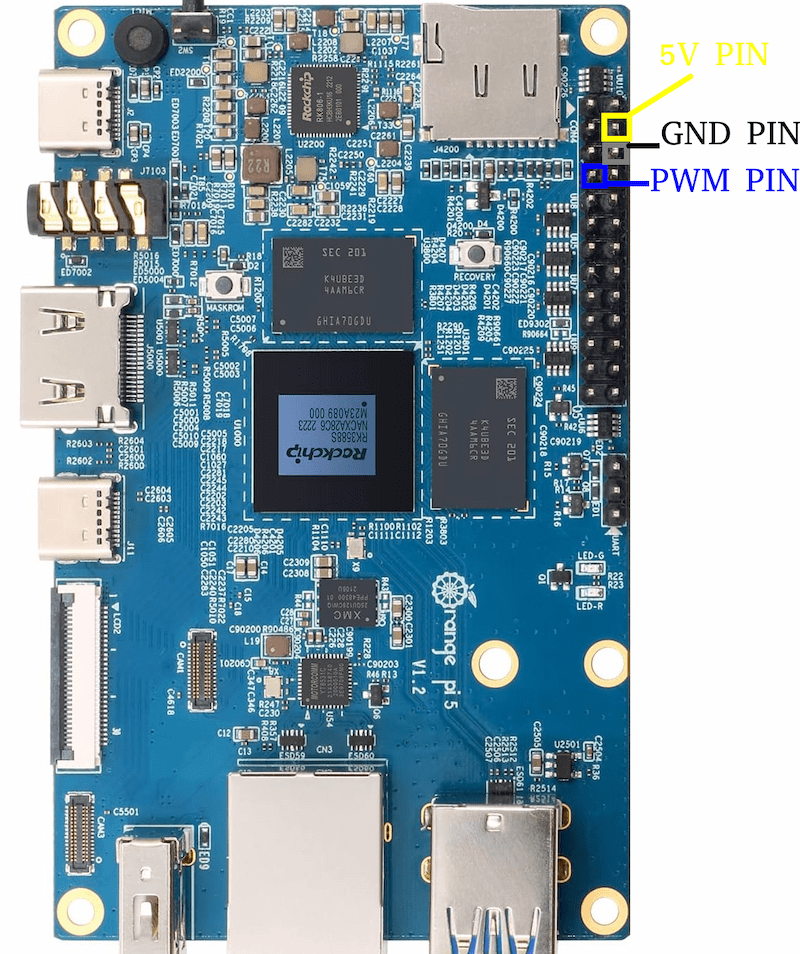
- What matters the most is the $\mathbf{\color{blue}{blue\quad PWM}}$ wire matches the software configuration.
On the board use the physical pin
7(wPipin2) on the GPIO header to use the default software configuration without any change. If for whatever reason you are forced to use another pin, then you will have to change theFAN_GPIO_PIN. To do that see the configuration section. - For the $\mathbf{\color{yellow}{yellow\quad 5V}}$ you have 2 options physical pins
2and4. - For the $\mathbf{\color{black}{black\quad GND}}$ you have 3 options physical pins
6,14and20.
We recommend to use the pins that are closest to each other, therfore physical pins 4 for 5V, 6 for GND and 7 for PWM marked below:
Orange Pi 5 Plus
I am currently using:
- Orange Pi 5 Plus
- GeeekPi PWM Controllable Fan 40x40x10mm
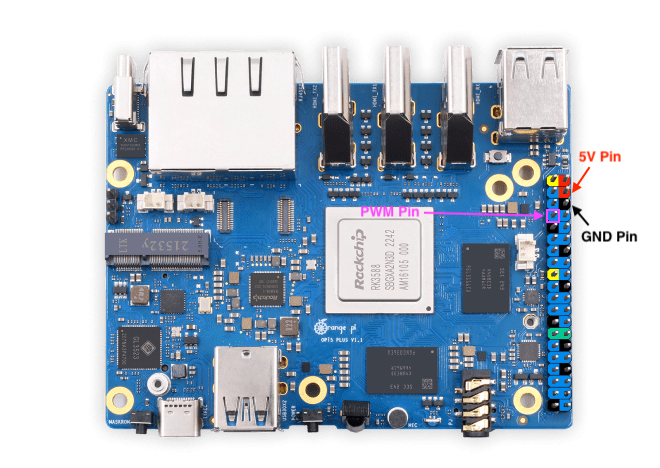
For the Orange Pi 5 Plus, I connect the fan to the 5V and GND pins and the PWM wire to the physical pin 7 (wPi pin 2) on the GPIO header.
It has been reported that some Orange Pi 5 Plus boards produce an unstable PWM frequency with the default settings. If you encounter this try setting the following in /etc/opifancontrol.conf:
PWM_RANGE=480
PWM_CLOCK=2
Software Installation & Updates
Prerequisites
Installed the wiringOP library. Check the installation instructions.
Install or Update via script
Run the following command to install or update the fan controller:
# Run again with sudo if you get permission errors
curl -sSL https://raw.githubusercontent.com/jamsinclair/opifancontrol/main/install.sh | bash
Install manually
- Copy the
opifancontrol.shscript to/usr/local/bin/and make it executable:
cp opifancontrol.sh /usr/local/bin/opifancontrol.sh
chmod +x /usr/local/bin/opifancontrol.sh
- Copy the
opifancontrol.conffile to/etc/:
cp opifancontrol.conf /etc/
- Copy the
opifancontrol.servicefile to/etc/systemd/system/:
cp opifancontrol.service /etc/systemd/system/
- Enable the service:
systemctl enable opifancontrol.service
Install as nix flake
github:jamsinclair/opifancontrol.
wiringOPis included.- Exposed packages are
opifancontrolandwiringOP, which includesgpiocommand for debugging (e.g.gpio readallto print your board's pin layout). - Creates a systemd unit for each configured fan.
Example:
  services.opifancontrol = {
    enable = true;
    boardType = "orangepi5plus";
    fans."cpu" = {
      tempLow = 35;
      tempMed = 45;
      tempHigh = 50;
      fanLow = 30;
      fanMed = 50;
      fanHigh = 60;
    };
    fans."box" = {
      fanGpioPin = 22;
      tempLow = 40;
      tempMed = 45;
      tempHigh = 50;
      fanLow = 20;
      fanMed = 30;
      fanHigh = 40;
      debug = true;
    };
  };
Configuration
The configuration file is located at /etc/opifancontrol.conf. The default configuration is:
# The GPIO pin to use for the fan. This is the wPi pin number, not the physical pin number.
# You can find the wPi pin number by running `gpio readall` on the Orange Pi.
FAN_GPIO_PIN=2

# TEMP_LOW, TEMP_MED, TEMP_HIGH are in degrees Celsius
# FAN_LOW, FAN_MED, FAN_HIGH are in percent of max fan speed, max 100.
# The fan will only be turned on if the temperature is above TEMP_LOW.
TEMP_LOW=55
FAN_LOW=50
TEMP_MED=65
FAN_MED=75
TEMP_HIGH=70
FAN_HIGH=100

# How frequently, in seconds, to poll the temperature data
TEMP_POLL_SECONDS=2

# To avoid rapid on/off switching, the fan will delay switching back on if it was recently turned off.
RAMP_UP_DELAY_SECONDS=15
# The ramp down delay is how long the fan will stay on after the temperature drops below the threshold.
RAMP_DOWN_DELAY_SECONDS=60
# The amount to change the fan speed per step when ramping up or down, in percent.
RAMP_PERCENT_PER_STEP=2
# The delay between each step when ramping up or down, in seconds.
RAMP_STEP_DELAY=0.03
# The minimum fan speed percentage when the fan is on. This helps ensure the fan always spins when activated.
FAN_MIN_PERCENT=30

# The PWM range and clock are used to control the fan speed. You shouldn't need to change these unless you know what you're doing.
# Assumes the CPU fan runs at 25kHz.
PWM_RANGE=96
PWM_CLOCK=10

# Set to true to enable debug logging of fan speed changes.
DEBUG=false
Debugging
Update the config file with your editor of choice (vim, nano etc.)
nano /etc/opifancontrol.conf- Add the line
DEBUG=trueor update the existing line to match.
The debugging information can be printed out with journalctl
journalctl -u opifancontrol
This will output information of the current settings and changes to fan speed.
Uninstallation
To uninstall the fan controller, first stop and disable the service:
systemctl stop opifancontrol.service
systemctl disable opifancontrol.service
Then remove the files:
rm /usr/local/bin/opifancontrol.sh
rm /etc/opifancontrol.conf
rm /etc/systemd/system/opifancontrol.service
UEFI Fan Control
The Orange Pi 5 and Orange Pi 5 Plus also have a dedicated fan header and fan control. This is supported by the Rockchip UEFI firmware and can be updated to select the pins, temperature thresholds and fan speeds for fan control without the need for this project.
For more information on how to update the UEFI firmware, see the EDK2 UEFI firmware for Rockchip or your Orange Pi manual. This project will not be updated to support the UEFI firmware fan control and aims to keep things simple.
License
This project is licensed under the MIT License - see the LICENSE file for details.
Dự án tương tự
Khám phá các dự án và mô hình AI khác có sự tương đồng.
Ollama alternative for Rockchip NPU: An efficient solution for running AI and Deep learning models on Rockchip devices with optimized NPU support ( rkllm )
Minimal NixOS running on RK3588/RK3588s based SBC(Orange Pi 5 Plus, Orange Pi 5, Rock 5A, etc)
🍊 Instructions on how to get an Armbian image ready for use with an Orange Pi device, including its GPIO. 🍊
The easiest, full-featured wireless router setup for Debian-based devices. Period.
Self-hosted AI agent OS. Your memory, chat, agents, and files stay on hardware you own, offline by default, cloud by choice. Offline AI memory (taOSmd), self-hosted multi-framework group chat, a full web desktop + app store, and auto-clustering across the consumer hardware you already have (Orange/Raspberry Pi, Mac mini, gaming PC).