 Switzerland
Spiritdude/Print3r
Command line interface (CLI) for 3d printing
Print3r
Introduction
Print3r is a command-line tool (without GUI) to print 3d parts (.gcode, .stl, .amf, .3mf, .obj, .off, .scad, .sscad, etc) to 3d printers, utilizing a slicer of your choice (Slic3r, Slic3r PE, PrusaSlicer, SuperSlicer, CuraEngine 3.x, CuraEngine 4.x, CuraEngine 5.x, Cura 15.04 and a few more).
Examples
print3r -p prusa-i3 print cube.scad
print3r -p ender3 -d /dev/ttyUSB1 print cube.stl
print3r preview cube.gcode
Main Features
- print
.scad,.stl* or.gcodeto 3d printers - slice
.scador.stl* saving.gcodewithout printing - preprocess parts with
--scale=<x>,<y>,<z>,--rotate=<x>,<y>,<z>,--translate=<x>,<y>,<z>,--random-placement,--auto-center,--multiply-part=<n> - use slicer-independent arguments like
--temperature=<c>,--layer-height=<h>,--fill-density=<f>,--perimeters=<n>, etc. - send Gcode from command line arguments with gcode or console interactively with gconsole command
- render Gcode and sliced .stl, .scad into
.pngimage with render command - preview Gcode using
yagvGcode viewer with preview command - log lists all past finished prints with all settings used
*) .stl (ascii & binary), and preliminary .amf and .obj supported as well.
Changelog
2022:
- 0.3.20: new
@revo-{yellow,red,blue,green,pink}macros,-o <output>added - 0.3.19:
--device/-d --printer/-p --slicer/-sshort-cuts added - 0.3.18: support CuraEngine-5.x / cura5 better
- 0.3.17: adding locks for avoiding to print simulatenously to the same printer, better support for cura-slicer & CuraEngine 5.x
- 0.3.16:
--scadwith--scad.=to pass variables to OpenSCAD models, experimental support for metatron-andenoch-slicer(--slicer=metatronorenoch) - 0.3.15: experimental support for voxgl-slicer (
--slicer=voxgl)
2021:
- 0.3.14: experimental support for
lab-slicerandvox3l-slicer(--slicer=laborvox3l) - 0.3.13: supporting webcams via
webcam=<url>[ <url2>...]andwebcam_snap=<settings>[ <setting2>...] - 0.3.12: more printer info in log-file, firmware and
M501output - 0.3.11: experimental support for
zplus-slicer(--slicer=zplus) - 0.3.10: each successful(ended) logged print contains new or
--uid=...uid (to track printed parts) - 0.3.9: 'log' lists all finished prints, incl. search with term or reference (see help)
- 0.3.6: support for
--post=<post1>[,<post2>...]and--post_<post1>=proc %i -o %o - 0.3.5: experimental support for --slicer=cura-slicer & 5dmaker
- 0.3.4: --cols=
and --rows= in case --multiply-part is used - 0.3.3: experimental support for
--slicer=mandolineadded - 0.3.2: experimental support for
--slicer=slicer4rtnadded
2019:
- 0.3.0: better pipeline of processing div. formats, preliminary 3mf and 3mj (new format) support
- 0.2.8: CuraEngine-4.2.0 support via
--slicer=cura4, see wiki for install instructions - 0.2.6: cleaner script-layer within Gcode processing, slic3r-*: better multi-extruder support
--toolmap&--toolremap - 0.2.5: preliminary
--slicer=prusasupport, additional inline functions support for gcode transformation:&toolcolor(n,a,b,c,d,e),&hsl2cmy(h,s,l),&phases(n=2|3,p=3|4) - 0.2.3: support for
--prepend_gcode=...for start-gcode addition, and--layer-gcode=... - 0.2.2: support for
skirts,brimsandrafts,supportandseamslicer-independent
2018:
- 0.2.0:
clientcommand added, and--device=tcp:<remote-ip>[:<n>]added for remote printing capabilities - 0.1.8: proper cleanup of temporary files (incl. CTRL-C abort)
- 0.1.7: more slicer-independent speed settings (
print/travel/infill/perimeter/small_perimeter/bridge/retract_speed) - 0.1.6: restructure the file layout of settings (e.g. at
/usr/share/print3r&~/.config/print3r/) - 0.1.5: new option
--scad=<code>to additionally execute openscad code - 0.1.4: various improvements, remap() of general settings to slice-specific settings via
.../<slicer>/map.ini - 0.1.1: better support for
--slicer=curaandcura-legacy - 0.1.0:
--slicer=<slicer>with--printer=<profile>leads to../<slicer>/<profile>,@<setting>leads tosettings/macro/<setting> - 0.0.9: preliminary
.amfand.objnative support for preprocessing (scale,rotate,translate,mirror) - 0.0.8: absolute scaling like
--scale=0,0,30mmor--scale=50mm, and--scale=50%same as--scale=0.5,--auto-centerto center print - 0.0.7:
PRINT3Renviromental variable considered,'baudrate=auto'probes baudrate. - 0.0.6: publically released source on github
To Do / Planned
slicer agnostic, e.g. support of CuraEngine (just the slicer): done since 0.1.6 withslic3r,slic3r-pe,cura-legacyandcuranetwork connectivity, distributed printing via tcp/ip: done since 0.2.0 withclientcommand and--device=tcp:<remote-ip>[:<n>](n=0 (default),1,2 etc)preview gcode in OpenGL/WebGL zoomable views: done with 0.1.6 via externalyagvviewer- multiple extruder support (preferably slicer-independent)
Platform
Primary focus in on Linux (Debian, Ubuntu) and alike platforms like FreeBSD and such.
Requirements
- install
openscad, see OpenSCAD.org - install
slic3r, Debian/Ubuntu:apt install slic3r - optional:
- recommended: install Slic3r PE
- recommended: install CuraEngine
- install CuraEngine Legacy
- recommended: install FreeCAD2Any which supports FCStd, IGES, STEP and Brep import as well
License
The software is licensed under GPLv3
Download
git clone https://github.com/Spiritdude/Print3r
cd Print3r
Install
make requirements
make install
Printer Configurations
See Profiles how to setup a dedicated printer profile.
Usage
Print3r (print3r) 0.3.20 USAGE: [<options>] <cmd> <file1> [<...>]

   options:
      --verbose or -v or -vv  increase verbosity
      --quiet or -q           no output except fatal errors
      --baudrate=<n>          set baudrate, default: 115200
         -b <n>
      --device=<d>            set device, default: /dev/ttyUSB0
         -d <device>
      --slicer=<slicer>       set slicer, default: slic3r
         -s <slicer>
                                 5dmaker, cura, cura-legacy, cura-slicer, cura4, cura5, curax, enoch, goslice, kirimoto, lab, mandol
ine, metatron, prusa, slic3r, slic3r-pe, slicer4rtn, super, vox3l, voxgl, zplus
      --printer=<name>        config of printer, default: default
         -p <name>
      --version               display version and exit
      --output=<file>         define output file for 'slice' and 'render' command
         -o <file>
      --scad                  consider all arguments as actual OpenSCAD code (not files)
      --scadlib=<files>       define OpenSCAD files separated by "," or ":"
                              by default 'use <file>', change with --scadimport=include
      --prepend-gcode=...     add manually start-gcode
      --layer-gcode=...       insert gcode at layer change
      --display_update=off    turn built-in display updates off
      --post_<stage>=...      define a post-processing stage (use '%i' input file, '%o' output file)
      --post=<stage>[,<stage>]  apply post-processing stage(s)
      part preprocessing:
         --random-placement   place print randomly on the bed
         --auto-center        place print in the center
         --multiply-part=<n>  multiply part(s)
            --rows=<n>           define rows for multiplied parts
            --cols=<n>           define cols for multiplied parts
         --scale=<x>,<y>,<z>     scale part x,y,z (absolute if 'mm' is appended)
         --scale=<f>             scale part f,f,f
         --rotate=<x>,<y>,<z>    rotate x,y,z
         --translate=<x>,<y>,<z> translate x,y,z
         --mirror=<x>,<y>,<z>    mirror x,y,z (0=keep, 1=mirror)
      --uid=<id>              define part unique id (default: auto generated uid)
      --<key>=<value>         include any valid slicer option (e.g. slic3r --help)

   commands:
      print <file> [...]      print (convert & slice & print) part(s) (3mf, 3mj, 5mf, amf, brep, fcstd, iges, obj, off, step, stl)
      slice <file> [...]      slice file(s) to gcode (same formats as 'print')
      preview <file> [...]    slice & preview (same formats as 'print')
      render <file> [...]     render an image (use '--output=sample.png' or so)
      gcode <code1> [...]     send gcode lines
      gconsole                start gcode console
      client                  map USB connected printer to network (per device)
      log [<term>|<#num>]     list log of finished prints, use -v for details or --format=json to dump JSON
                                 use --output=<k>[,<k1>] to list particular keys
                                 if num is negative, the last entries are shown, e.g. '#-5'
      help

   examples:
     export PRINT3R "printer=my_printer" --OR-- setenv PRINT3R "printer=my_printer"
      print3r slice cube.stl
      print3r --layer-height=0.2 -o test.gcode slice cube.stl
      print3r -p ender3 -d /dev/ttyUSB1 print test.gcode
      print3r -p corexy -d /dev/ttyUSB2 --layer-height=0.3 --fill-density=0 print cube.stl
      print3r -p ender3 -d tcp:192.168.0.2 --layer-height=0.25 print cube.stl
      print3r print cube.scad
      print3r print parametric.scad --scad.A=20 --scad.B=30
      print3r --scad print "cube(20)"
      print3r --scad print "cube(a)" --scad.a=20
      print3r log
      print3r --output=uid,layer_height log cube
      print3r log -v '#12'
      print3r gcode 'G28 X Y' 'G1 X60' 'G28 Z'
      print3r gconsole
      == Print3r: Gcode Console (gconsole) - use CTRL-C or 'exit' or 'quit' to exit
         for valid Gcode see https://reprap.org/wiki/G-code
         conf: device /dev/ttyUSB0, connected
      > M115
      ...
More Examples
print3r --fill-density=0 --layer-height=0.2 print cube.scad
print3r --print-center=100,100 print cube.scad
print3r --printer=ender3.ini --device=/dev/ttyUSB1 --random-placement --rotate=45,0,0 print cube.scad
print3r -p ender3.ini -d /dev/ttyUSB1 --random-placement --rotate=45,0,0 print cube.scad
print3r --multiply-part=3 --scale=50% print cube.scad
Scaling Parts
print3r --scale=2 print cube.scad
print3r --scale=1,4,0.5 print cube.scad
print3r --scale=30% print cube.scad
print3r --scale=50mm print cube.scad
print3r --scale=0,0,30mm print 3DBenchy.stl
Environment Variable PRINT3R
You can set any option into PRINT3R environment variable, "<key>=<value>", combined with ":", like:
export PRINT3R "printer=prusa-i3:temperature=190:..."
print3r print cube.scad
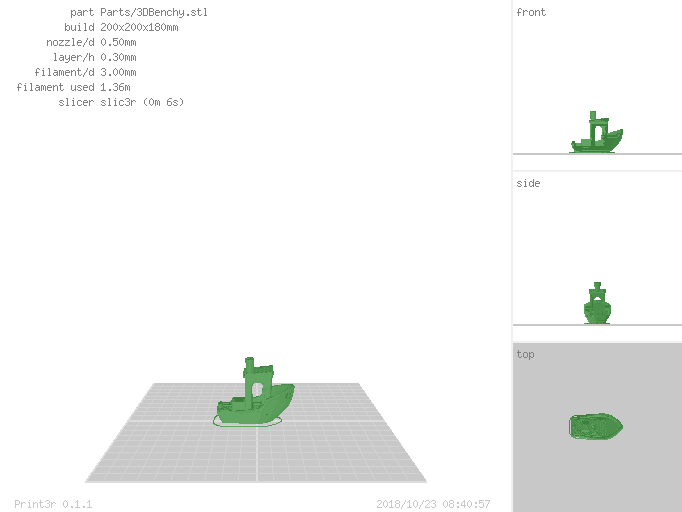
Render Example
Instead to actually print parts, you can also let them render into .png image as well (e.g. for documentation purposes or preview):
print3r --output=benchy.png render 3DBenchy.stl
See Also
- Print3r Wiki, detailed documentation
- Spiritdude's Public Notebook: Print3r
Similar Projects
Discover other similar projects and AI models.
Your Bambu Lab. No Cloud. Your Rules. Self-hosted command center for Bambu Lab — from one A1 to an entire print farm.
Powerful, fast and robust engine for converting 3D models into g-code instructions for 3D printers. It is part of the larger open source project Cura.
This is an experimental slicer for 3d printing written in Go also usable as modular slicing lib.
OpenPythonSCAD library for moving a tool in lines and arcs so as to model how a part would be cut using G-code or described as a DXF.