 United States
DOI-USGS/geoknife
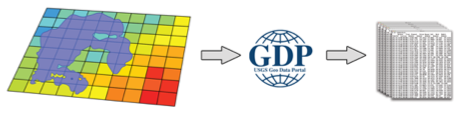
R tools for geo-web processing of gridded data via the Geo Data Portal. geoknife slices up gridded data according to overlap with irregular features, such as watersheds, lakes, points, etc.
geoknife package version 1.6.10
Tools for geo-web processing of gridded data via the Geo Data
Portal.
geoknife slices up gridded data according to overlap with irregular
features, such as watersheds, lakes, points, etc. The result is
subsetted data in plain text, NetCDF, geotiff or other formats.
Installing geoknife
To install the geoknife from CRAN:
install.packages("geoknife")
Or to install the current development version of the package:
install.packages("remotes")
remotes::install_github('DOI-USGS/geoknife')
Reporting bugs
Please consider reporting bugs and asking questions on the Issues page: https://github.com/DOI-USGS/geoknife/issues
Code of Conduct
We want to encourage a warm, welcoming, and safe environment for contributing to this project. See the code of conduct for more information.
Package Support
The Water Mission Area of the USGS supports the development and
maintenance of geoknife through September 2018, and most likely
further into the future. Resources are available primarily for
maintenance and responding to user questions. Priorities on the
development of new features are determined by the geoknife development
team.

geoknife overview
The geoknife package was created to support web-based geoprocessing of
large gridded datasets according to their overlap with landscape (or
aquatic/ocean) features that are often irregularly shaped. geoknife
creates data access and subsequent geoprocessing requests for the USGS’s
Geo Data Portal to carry out on a web server. The results of these
requests are available for download after the processes have been
completed. This type of workflow has three main advantages: 1) it allows
the user to avoid downloading large datasets, 2) it avoids reinventing
the wheel for the creation and optimization of complex geoprocessing
algorithms, and 3) computing resources are dedicated elsewhere, so
geoknife operations do not have much of an impact on a local computer.
geoknife interacts with a remote server to figure out what types of
processing capabilities are available, in addition to seeing what types
of geospatial features are already available to be used as an area of
interest (commonly, these are user-uploaded shapefiles). Because
communication with web resources are central to geoknife operations,
users must have an active internet connection.
The main elements of setting up and carrying out a geoknife ‘job’
(geojob) include defining the feature of interest (the stencil
argument in the geoknife function), the gridded web dataset to be
processed (the fabric argument in the geoknife function), and the
the processing algorithm parameters (the knife argument in the
geoknife function). The status of the geojob can be checked with
check, and output can be loaded into a data.frame with result.
What can geoknife do?
Define a stencil that represents the geographic region to slice out of the data
library(geoknife)
# from a single point
stencil <- simplegeom(c(-89, 46.23))
   # -- or --
# from a collection of named points
stencil <- simplegeom(data.frame(
              'point1' = c(-89, 46),
              'point2' = c(-88.6, 45.2)))
   # -- or --
#for a state from a web available dataset
stencil <- webgeom('state::New Hampshire')
stencil <- webgeom('state::New Hampshire,Wisconsin,Alabama')
   # -- or --
#for HUC8s from a web available dataset
stencil <- webgeom('HUC8::09020306,14060009')
Define a fabric that represents the underlying data
# from the prism dataset:
fabric <- webdata('prism')
   # -- or --
# explicitly define webdata from a list:
fabric <- webdata(list(
            times = as.POSIXct(c('1895-01-01','1899-01-01')),
            url = 'https://cida.usgs.gov/thredds/dodsC/prism_v2',
            variables = 'ppt'))
# modify the times field:
times(fabric) <- as.POSIXct(c('2003-01-01','2005-01-01'))
Create the processing job that will carry out the subsetting/summarization task
job <- geoknife(stencil, fabric, wait = TRUE)

# use existing convienence functions to check on the job:
check(job)
## $status
## [1] "Process successful"
##
## $URL
## [1] "https://labs.waterdata.usgs.gov:443/gdp-process-wps/RetrieveResultServlet?id=3362d55f-6d35-4e21-baf6-51a2583bc8bdOUTPUT"
##
## $statusType
## [1] "ProcessSucceeded"
##
## $percentComplete
## [1] "100"
see also:
running(job)
error(job)
successful(job)
Plot the results
data <- result(job)
plot(data[,1:2], ylab = variables(fabric))

Use an email to listen for process completion
job <- geoknife(webgeom('state::New Hampshire'), fabric = 'prism', email = 'fake.email@gmail.com')
geoknife Functions (as of v1.1.5)
| Function | Title |
|---|---|
geoknife | slice up gridded data according to overlap with feature(s) |
gconfig | set or query package settings for geoknife processing defaults |
algorithm | the algorithm of a webprocess |
attribute | the attribute of an webgeom |
check | check status of geojob |
download | download the results of a geojob |
error | convenience function for state of geojob |
running | convenience function for state of geojob |
successful | convenience function for state of geojob |
start | start a geojob |
cancel | cancel a geojob |
geom | the geom of a webgeom |
inputs | the inputs of a webprocess |
id | the process id of a geojob |
values | the values of a webgeom |
result | load the output of a completed geojob into data.frame |
variables | the variables for a webdata object |
wait | wait for a geojob to complete processing |
times | the times of a webdata object |
url | the url of a webdata, webgeom, geojob, or webprocess |
version | the version of a webgeom or webdata |
xml | the xml of a geojob |
query | query datasets or variables |
geoknife classes (as of v0.12.0)
| Class | Title |
|---|---|
simplegeom | a simple geometric class. Extends sp::SpatialPolygons |
webgeom | a web feature service geometry |
webprocess | a web processing service |
webdata | web data |
geojob | a geo data portal processing job |
datagroup | a simple class that contains data lists that can be webdata |
What libraries does geoknife need?
This version requires httr, sp, and XML. All of these packages are
available on CRAN, and will be installed automatically when using the
install.packages() instructions above.
Check Notes:
In addition to typical R package checking, a Dockerfile is included in this repository. Once built, it can be run with the following command.
docker build -t geoknife_test .

docker run --rm -it -v %cd%:/src geoknife_test /bin/bash -c "cp -r /src/* /check/ && cp /src/.Rbuildignore /check/ && cd /check && Rscript -e 'devtools::build()' && R CMD check --as-cran ../geoknife_*"
Release Procedure
For release of the sbtools package, a number of steps are required.
- Ensure all checks pass and code coverage is adequate.
- Ensure
NEWS.mdreflects updates in version. - Update
DESCRIPTIONto reflect release version. - Convert
DISCLAIMER.mdto approved language and rebuildREADME.Rmd. - Create release candidate branch and commit release candidate.
- Build source package and upload to CRAN.
- Once accepted to CRAN, tag release candidate branch an push to repositories.
- Change
DISCLAIMER.mdback to development mode and increment description version. - Merge release candidate and commit.
- Open PR/MR in development state.
Disclaimer
This software is preliminary or provisional and is subject to revision. It is being provided to meet the need for timely best science. The software has not received final approval by the U.S. Geological Survey (USGS). No warranty, expressed or implied, is made by the USGS or the U.S. Government as to the functionality of the software and related material nor shall the fact of release constitute any such warranty. The software is provided on the condition that neither the USGS nor the U.S. Government shall be held liable for any damages resulting from the authorized or unauthorized use of the software.

Similar Projects
Discover other similar projects and AI models.
:lock_with_ink_pen: Opinionated, typographic-centric ggplot2 themes and theme components